MCP Setup
TL;DR
ClaudeKit routes MCP (Model Context Protocol) server usage through /ck:use-mcp. This keeps heavy tool manifests out of the primary agent until a task actually needs MCP access.
Setup Checklist
- Copy the template config
cp .claude/.mcp.json.example .claude/.mcp.json - Customize the MCP roster
- Remove the default sample servers:
context7,human-mcp,chrome-devtools,sequential-thinking. - Add only the MCP servers you truly need to avoid unnecessary token use.
- Remove the default sample servers:
- Save the configuration so
/ck:use-mcpcan load clients from.claude/.mcp.jsonon demand.
💡 Keep
.claude/.mcp.jsonoutside your main prompts so the core agent never loads server manifests unless explicitly requested.
Using MCP Tools
Trigger configured tools via the /ck:use-mcp command:
/ck:use-mcp <instruction>Example
/ck:use-mcp Use chrome-devtools mcp to capture a screenshot of google.comClaudeKit loads the configured MCP clients, analyzes available tools, executes the best fit, and returns the results to your primary chat.
Technical Deep Dive
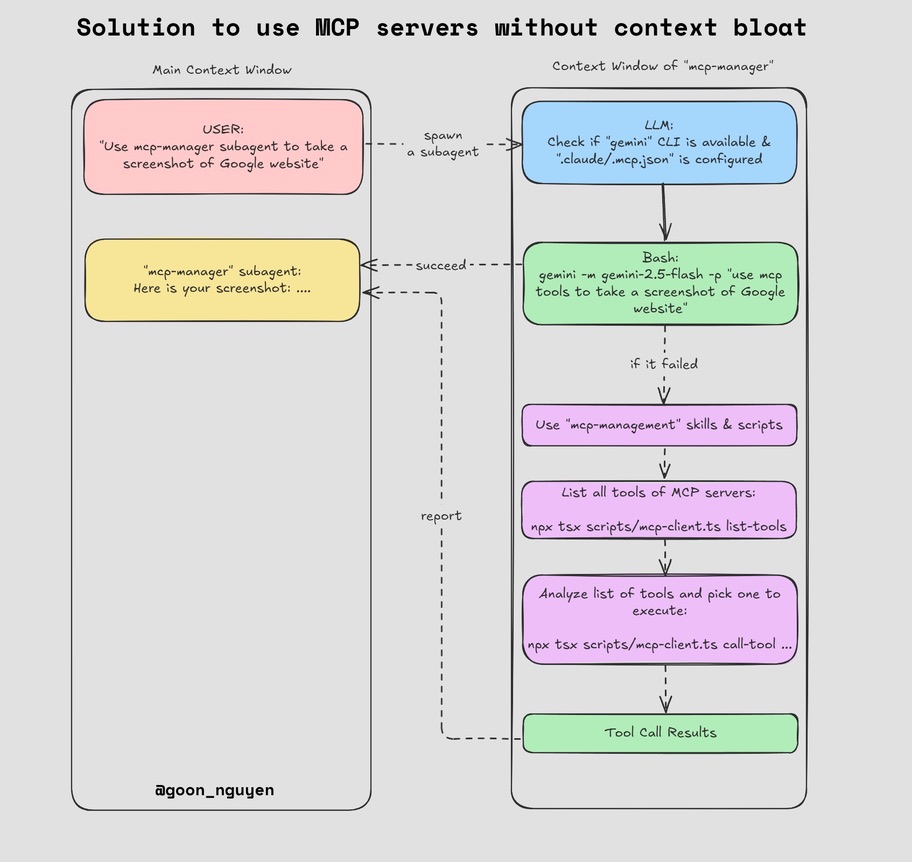
Why This Architecture?
Anthropic’s “Code Execution with MCP” pattern inspired a lightweight approach: subagents have their own context windows. Loading MCP manifests directly into the main agent quickly bloats its context—especially with tool-heavy servers like Chrome DevTools or Playwright. By shifting those manifests into a subagent, the primary conversation stays clean even if dozens of MCP servers are configured.
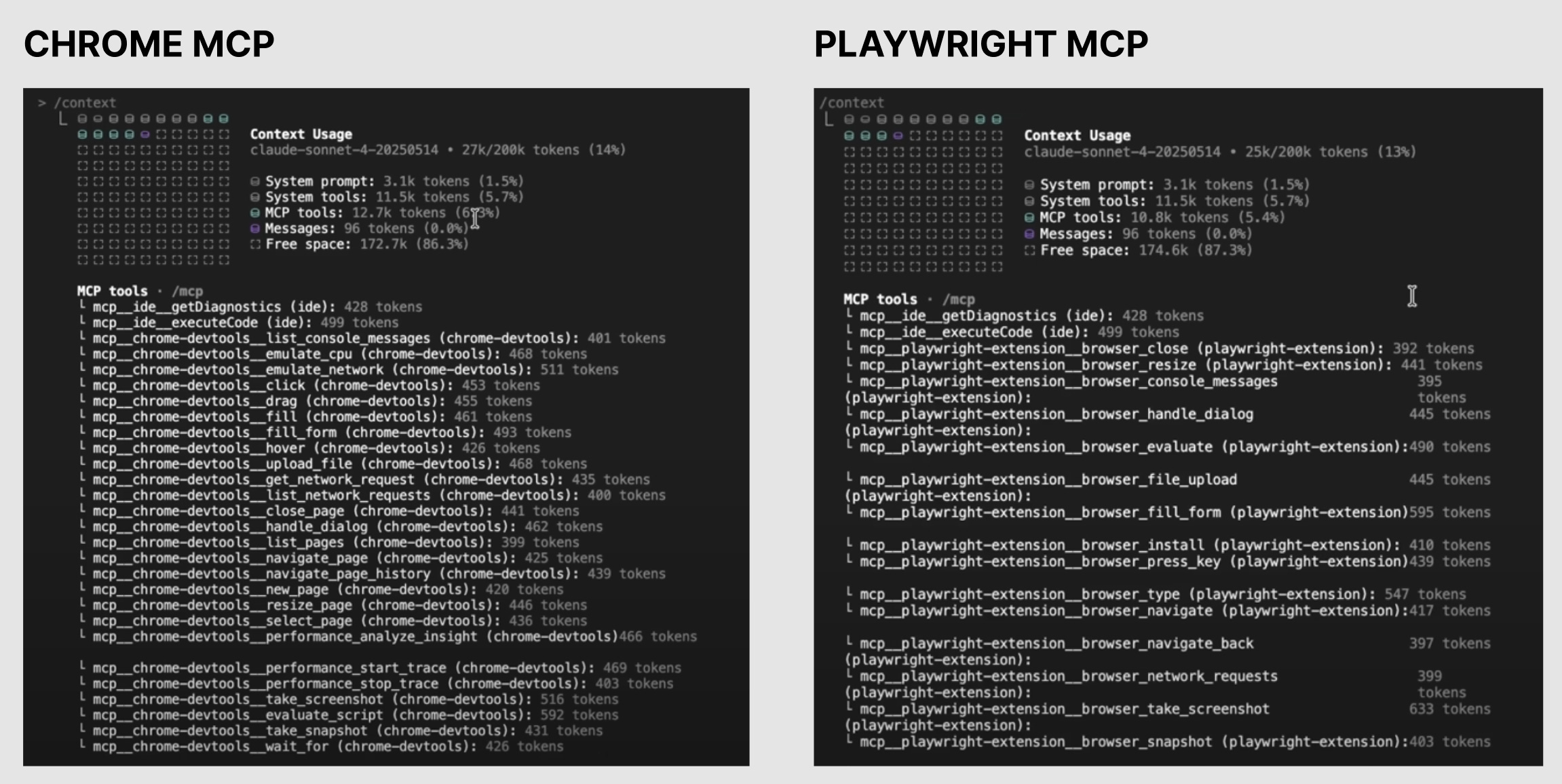
How It Works
- The use-mcp skill reads
.claude/.mcp.jsononly when a task asks for MCP access. - It can use an LLM-driven path for flexible tool selection or deterministic scripts for direct list/call workflows.
- When invoked, the skill:
- Loads
.claude/.mcp.json. - Connects to the declared MCP servers.
- Enumerates available tools and selects the best option for the prompt.
- Executes the tool invocation and streams the response back to the main agent.
- Loads
The result: your main context stays pristine, yet you can still tap into specialized MCP capabilities. (Yes, the joke still stands—you could register 80 MCP servers, but please add only what you really need.)
Further Optimization
Even with subagent isolation, processing massive MCP catalogs still burns tokens. To mitigate that, ClaudeKit can hand off heavy MCP orchestration to gemini-cli, shifting the most expensive reasoning to a cheaper, external runtime while keeping the main conversation focused.
Next Steps
- Keep refining
.claude/.mcp.jsonas your toolset evolves. - Version-control the file privately if it includes API endpoints or sensitive details.
- Pair
/ck:use-mcpwith automation commands (e.g.,/ck:cook,/ck:fix,/ck:plan) to mix bespoke tools with ClaudeKit’s native agents.
With this workflow, you get the power of MCP without the usual context penalty.